DNS 生效慢 / 域名还指向旧服务器?排查与解决
The most common DNS headache: changed nameservers, same old site. The key is separating a config error from cache lag — the fixes differ.
Step 1: config or cache?
Bypass local resolution, get the IP from public DNS, then force that IP. If you see the new site, your config is fine — it's cache.
Example: curl --resolve yourdomain:443:CFIP https://yourdomain/
Step 2: compare resolvers
- 看你的系统/路由器给什么
- 看 Google 公共 DNS 给什么
- 看 Cloudflare 公共 DNS 给什么
Step 3: flush caches
- ipconfig /flushdns
- sudo dscacheutil -flushcache(mac)/ 重启本地服务
- 关机重启,或在管理页清 DNS 缓存
Step 4: still stale?
Switch your local DNS to public resolvers (8.8.8.8 / 1.1.1.1) to bypass the router cache. Most reliable fix.
Checklist
- NS 已改?CNAME 正确?区域状态 active?
- 公共 DNS 是否已返回新 IP?
- 本地/路由器是否已清?
- 强制指定新 IP 访问,看到的是新内容吗?
Why HTTP 200 can still be the old site
A key trap: parked pages also return HTTP 200, so “it opens” is not the same as “it is the new site”. Check actual page content, not just the status code.
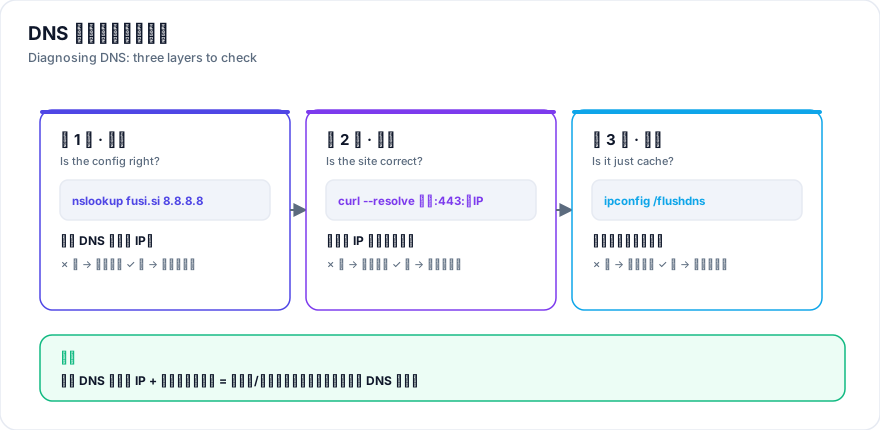
Three commands, three layers
# 1) 本地解析(看有没有本地缓存)
nslookup fusi.si

2) 公共解析(看全球是否已生效)
nslookup fusi.si 8.8.8.8

3) 直连新 IP(看站点内容是否正确)
curl --resolve fusi.si:443:新IP https://fusi.si/
Run these in order to tell "local cache" from "server config". If public DNS returns the new IP and direct-connect shows the new site, it is purely local cache.
Flushing per platform
- Windows:
ipconfig /flushdns - macOS:
sudo dscacheutil -flushcache; sudo killall -HUP mDNSResponder - Linux:
sudo systemd-resolve --flush-caches - Router:关机重启,或管理页清 DNS 缓存(最常见的隐藏缓存源)
- Browser:清除 DNS 缓存项,或用无痕窗口验证
The permanent fix
If it stays stale after flushing, the router is caching. Switch your adapter DNS to 8.8.8.8 / 1.1.1.1 (requires admin).
Real case: the false not-live alarm
Three days after the NS switch, the site still showed a Hostinger parked page and looked like a failed deploy. Public DNS already returned the new Cloudflare IP and direct-connect showed the new site — it was purely local/router cache. Switching adapter DNS to 8.8.8.8 / 1.1.1.1 fixed it instantly.
- Biggest lesson:HTTP 200 不代表是新站——停放页也返回 200,判断要看页面实际标题与内容。
- The verifying move:用
curl --resolve直连新 IP,一条命令就能区分「配置问题」与「缓存问题」。