用 Cursor 零基础搭个人网站
Want your own site but can't read code? AI editors like Cursor let you build pages by chat — and fix bugs without begging a dev.
Why Cursor
Classic site-building needs HTML/CSS/deploy. Cursor embeds AI in the editor: describe, it writes, and explains as it goes.
Setup
- 官网装 Cursor,登录账号
- 默认 Claude/ChatGPT 模型即可
- 放你的项目文件
Step 1: generate by chat
In chat, type: 'A single-page personal resume site, light theme, avatar and contact section, self-contained HTML.' It generates files.
Tip: add one feature at a time, preview in browser, then request the next.
Debug & iterate
- 把红色报错复制给它
- 方便你日后自己改
- 用 git 留底,坏了对账
Ship it
Once local works, push to free static hosts like Cloudflare Pages or GitHub Pages and bind your domain.
Who it's for
Resumes, portfolios and small landing pages fit well; complex backends still need pros.
A prompt that actually works
做一个单页个人作品集网站,要求:
- 浅色现代风格,主色蓝紫渐变
- 顶部导航(首页/关于/联系)
- 头像区 + 自我介绍 + 联系方式
- 响应式,手机端也要好看
- 自包含单个 HTML,内联 CSS
The last line matters: ask for a single self-contained HTML file so you can just open it.
How to iterate well
- One feature at a time:别一次要求 10 个功能,出了问题难定位。
- Preview every step:生成完立刻在浏览器打开看效果,再提下一个需求。
- Paste the error:把红色报错原文复制给它,比描述「坏了」有效得多。
- Ask for explanations:让 AI 注释关键代码,你以后能自己改。
Free deployment
Once it runs locally, push to a free static host and point your domain at it.
- Cloudflare Pages:拖拽上传即完成,自动 HTTPS(本站用的就是这个)
- GitHub Pages:适合已用 Git 管理代码的项目
- Netlify / Vercel:免费额度充足,流程类似
See our zero-cost hosting guide for the full domain-binding walkthrough.
Beginner pitfalls
- Asking for too much at once:先做骨架,再填内容。
- No backups:改之前先复制一份文件,或用 Git 留底。
- Not testing mobile:一定要在手机上看一遍,很多 AI 生成的布局在小屏会崩。
- Undocumented CDNs:确认页面不依赖临时外链,否则以后会失效。
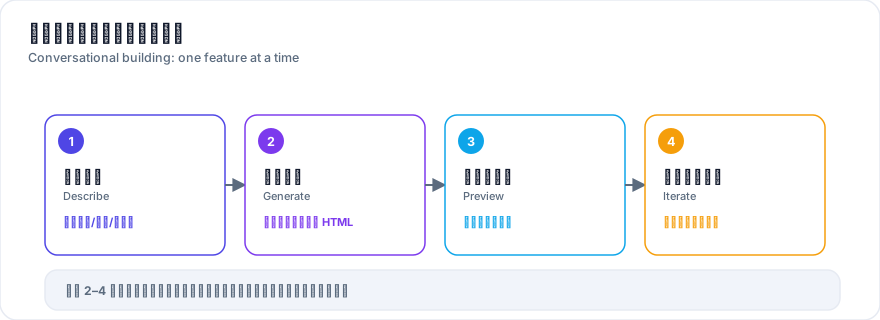
Real case: a non-coder ships a site
A non-coder built a one-page portfolio with Cursor: home + avatar + bio + contact, responsive. ~40 minutes from empty file to running locally, then deployed and bound a domain — about 1 hour total.
- What worked:要求输出「单文件自包含 HTML」避免依赖混乱;每加一个功能就预览验证。
- Ongoing upkeep:让 AI 在关键处加注释,日后自己也能小改,不必持续依赖工具。